

In this page
Scopes
Upcoming report for the site
Upcoming report for a space
Understand the Upcoming report
Past expiration dates
Upcoming expiration dates
Past archiving dates
Upcoming archiving dates
Expiration timeline
Archiving timeline
Security
What is the Upcoming report?
The Upcoming dashboard gives you a two-fold view of expiration and archiving activity across your Confluence site or specific spaces: a look back at the last 30 days, and a look ahead to the next 30 days. This lets you prevent content from expiring before it happens, and catch unexpected archiving, deletion, and purging before they occur.
Similar to other dashboards, the Upcoming dashboard transforms data on spaces, pages, blogs and users into clear summaries:
- You can view the number of pages and blog posts with past or upcoming expiration and archiving dates.
- You can see expiration and archiving events on a timeline, with the most urgent items surfacing first.
- You can gauge the volume of upcoming expiration and archiving events ahead of time, to plan your maintenance workload.
- You can act on content proactively, before it expires or gets archived, to prevent unwanted actions.
Scopes
The Upcoming dashboard is available for the whole Confluence site and for any single space.
Upcoming report for the site
For the site scope report, expand the Apps section in the left-bar (not Space apps!) → click the Better Content Archiving app → Upcoming tab. In this scope, the report covers all spaces, all contents and all activities on the site.

Upcoming report for a space
For the space scope report, go to the space → expand the Space apps section in the left-bar (not Apps!) → click the Better Content Archiving app → Upcoming tab. In this scope, the report covers only that single space, the contents and the activities in it.
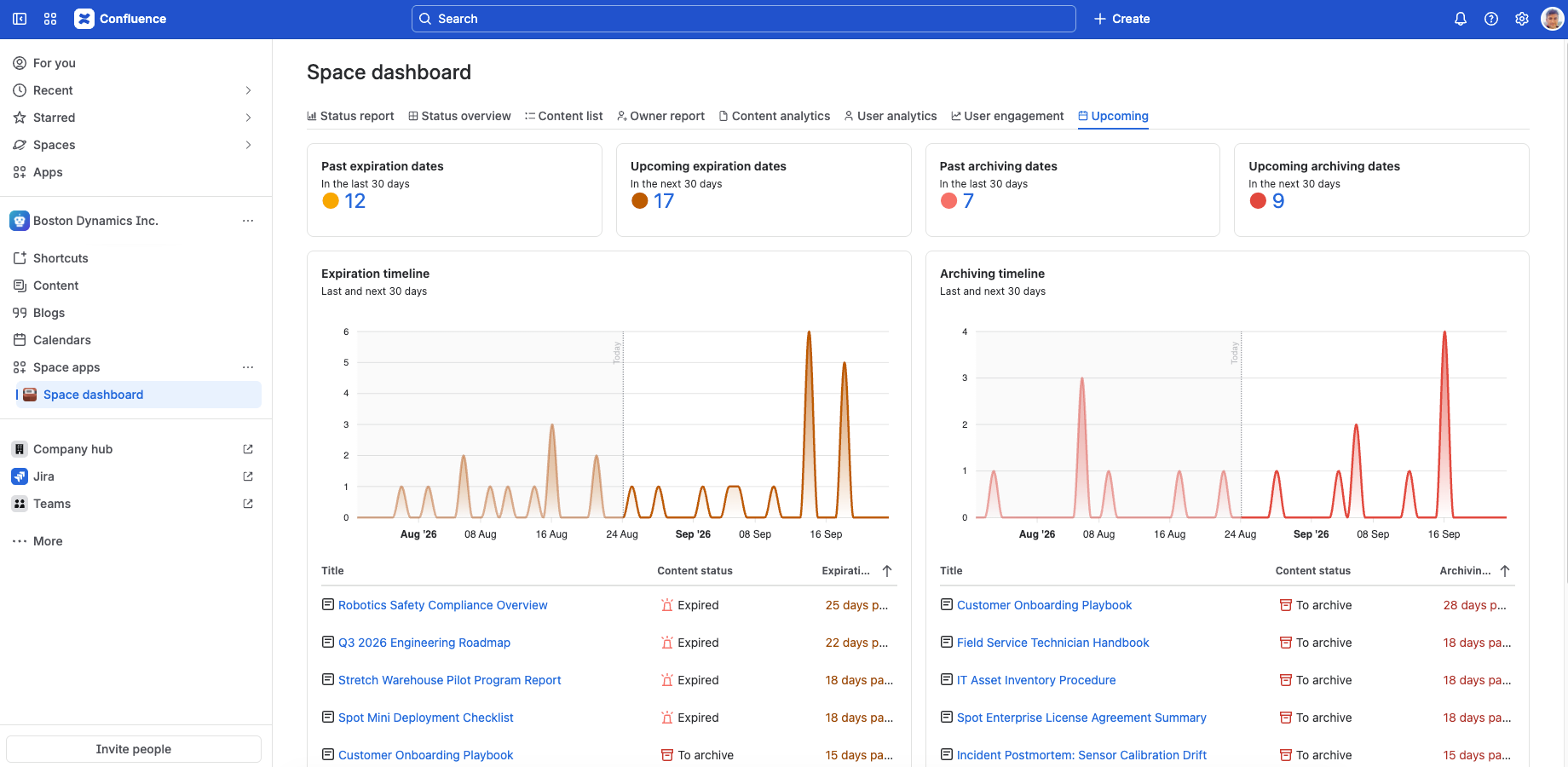
Understand the Upcoming report
The table below explains each gadget on this dashboard. Note that the dashboard works with expiration and archiving dates directly set on any piece of content, if any. If a content inherits an earlier expiration or archiving date from any of its ancestors, that date will be the effective one, but it won't be reflected on this dashboard.
The following section helps you understand the Upcoming report by explaining each gadget.
| Gadget | Description | Notes |
|---|---|---|
| Past expiration dates | Displays the total number of contents that passed their expiration date in the last 30 days on the Confluence site or in the space. Click the count to see these contents. | A high number can mean reviews are falling behind schedule. Consider setting up notifications so responsible parties are reminded to review content before it expires. |
| Upcoming expiration dates | Displays the total number of contents that are going to pass their expiration date in the next 30 days on the Confluence site or in the space. Click the count to see these contents. | A high number gives you early, forward-looking visibility into an approaching wave of reviews, so you can plan and distribute the workload before it piles up instead of reacting once content is already outdated. |
| Past archiving dates | Displays the total number of contents that passed their archiving date in the last 30 days on the Confluence site or in the space. Click the count to see these contents. | Review a high number to catch content archived unintentionally. Act quickly, since mistakes get harder to restore accurately the longer they go unnoticed. |
| Upcoming archiving dates | Displays the total number of contents that are going to pass their archiving date in the next 30 days on the Confluence site or in the space. Click the count to see these contents. | Review the content about to be archived, and if needed, extend the archiving date to avoid unwanted, accidental archiving. |
| Expiration timeline |
This timeline chart displays the number of contents that expired or are going to expire on any given day, covering the last 30 to the next 30 days.
Under the chart, preview the list of these contents.
(There is one data point per day.) |
The most urgent expirations surface first, and quiet periods and upcoming spikes are easy to spot at a glance, so you can plan reviews before content expires. To see the full list, click the "See all" link. |
| Archiving timeline |
This timeline chart displays the number of contents that are set to be archived on any given day, covering the last 30 to the next 30 days.
Under the chart, preview the list of these contents.
(There is one data point per day.) |
See exactly which contents are set to be archived and when, so you can catch and prevent unwanted archiving before it happens. To see the full list, click the "See all" link. |
Security
The Upcoming dashboard is available for all users. The dashboard respects the Confluence space permissions and page restrictions.
More precisely:
- If the app can't access a space or content (page or blog post), it will not collect analytics about it.
- If you can't view a space, the contents in it will not contribute to the data shown in the KPI gadgets and the charts. Also, its contents won't show up in the content lists opened.
- If you can't view a content, it will not contribute to the data shown in the KPI gadgets and the charts. Also, it won't show up in the content lists opened.
As the dashboard is personalized for the user who opens it, your dashboard view and your teammate's may be different.
Questions?
Ask us any time.